Game booster GFX Fire Fix
Royal Games BoostersLibraries & Demo
4.664.00 Reviews
- Version
- 26.08.28
- Installs
- 500.00K
- Age Rating
- Everyone
Screenshots
Our Review of Game booster GFX Fire Fix
 Analysis by Appyee
Game Booster GFX Fire Fix makes its appeal easy to understand: fewer disruptions can mean a more enjoyable gaming session. I’d think of it as a helper to try when a game feels demanding, not as a guaranteed fix for every stutter. A booster can’t change a phone’s hardware or repair an unstable connection, so the useful question is whether its adjustments fit your particular device and routine.
The first-week appeal: quick experiments, not miracles
During the first few days, the attraction is the chance to make a few focused changes instead of repeatedly guessing at a game’s settings. If a title offers graphics options, I’d start by lowering the most demanding visual choices one at a time, then play the same kind of match or level again. That makes it easier to tell whether a change helped, rather than crediting the app for a good round that might simply have been easier.
The same careful approach matters when using any memory-cleaning or performance tool. Closing background activity may make a phone feel less busy, but it does not create extra physical memory, and a mobile operating system may reopen apps it needs. I would use a booster before launching a demanding game, then avoid repeatedly tapping a clean-up control during play. Constantly closing and reopening apps can become its own interruption.
That distinction is especially useful for people who switch between a game, chat, and a browser. If returning to the game takes longer after clearing background apps, the small gain in available resources may not be worth losing that quick handoff. For a single focused session, the trade-off can make more sense.
What to check before blaming the phone
Lag can come from different places. Choppy animation may point toward graphics load or device strain; delayed actions in an online match may instead come from the network or the game’s servers. A booster is more plausible as a help for local performance than as a cure for a weak Wi-Fi signal or a distant server. I’d check whether the problem also appears in offline play before deciding the app has solved—or failed to solve—it.
Heat is another signal, but it deserves a measured response. If your phone becomes uncomfortable during a long session, take a break, lower the game’s demands where possible, and let the device cool naturally. A temperature display can make it easier to notice a pattern, but it should not encourage pushing the phone harder because a number still looks acceptable. Charging while playing can add strain too, so separating charging from an extended session is a sensible habit when practical.
One useful test is to compare similar sessions rather than rely on a single dramatic before-and-after impression. Keep the game, network, and approximate session length consistent, and change only one setting at a time. If the result is no more stable after a few tries, return to the game’s own defaults. That keeps experimentation reversible and stops a collection of tweaks from making it harder to identify the actual cause.
Month-to-month value depends on your routine
A booster earns a permanent place on my phone only if it solves a recurring annoyance with little effort. Someone who plays the same demanding game most evenings may value a repeatable pre-game routine: check the game’s graphics, close what they do not need, and start a session with a familiar setup. Someone who plays casually for a few minutes at a time may find that the game’s built-in settings and ordinary phone controls are enough.
For example, imagine you have a short break and want to fit in one online match. If the game usually runs smoothly after a fresh launch, opening another app first may add friction rather than remove it. But if you regularly notice stutters after using several apps, trying a booster before the match could be worthwhile. The key is to judge it by whether it improves that repeated situation, not by how impressive the first launch feels.
Compared with the usual alternatives, Game Booster GFX Fire Fix sits between manual tweaking and relying entirely on a phone’s built-in gaming tools. A game’s own graphics menu is often the most direct place to balance visual quality and smoothness. System-level game modes, when available on a device, may be more convenient because they are already integrated. A separate booster can be useful when you want a dedicated place to experiment, but installing one is not automatically better than using the controls you already have.
I would also avoid changing several graphics options at once. A lower frame rate or simpler visuals can be a fair exchange for steadier play, but it may make a game look less appealing. Try the smallest adjustment that addresses the problem, and keep a note in your own mind of what you changed. If you dislike the result, restoring the earlier setting is easier than trying to remember a whole bundle of alterations.
Who is likely to keep using it?
This is most appealing to Android players who enjoy adjusting their setup and have a specific game that regularly pushes their phone. It may also suit someone who wants a simple starting point for performance experiments rather than learning every system setting. The app is in the Libraries & Demo category, is developed by Royal Games Boosters, and is free, which makes trying it a relatively low-commitment choice.
On the other hand, I would skip it if your games already run well, if your main issue is a poor internet connection, or if you would rather not add another step before playing. People who need maximum visual detail may also prefer to leave graphics untouched, even if that means accepting occasional slowdowns. A booster is a poor match when its adjustments create more fiddling than the original problem caused.
When deciding whether to keep it, ask yourself a practical question after several sessions: did I open it because it reliably helped, or because I felt I should? If the answer is the latter, uninstalling it or returning to the game’s own settings is reasonable. The best setup is the one that lets you start playing without a maintenance ritual.
Age, compatibility, and the basic choice
The app is rated Everyone, and its listed minimum Android requirement is version 7.0. That gives older Android devices a possible route to try it, although compatibility alone does not promise that every phone or game will behave the same way. I’d check that it installs on my device, then test it with one game before building a habit around it.
Its average rating is 4.5 from around 4,600 ratings, and it has more than 500,000 installs. Those figures suggest that many people have tried it, but they cannot tell you whether it will improve your particular game on your particular phone. The current version is 25.09.27; for me, the meaningful test is still whether a repeatable change makes a real difference in everyday use.
Before keeping any game utility, I’d also consider how much attention it asks for. A tool that requires frequent adjustments can interrupt the very play it is meant to support. If the app’s controls are straightforward for you, a quick setup may be worth it; if you find yourself troubleshooting the booster as often as the game, stick with the game’s own options.
Ever caught yourself in the middle of a heated game, only to be rudely interrupted by lag or stuttering graphics? Yeah, I’ve been there too, and it’s beyond frustrating. That’s where Game Booster GFX Fire Fix steps in, promising to take your gaming experience to the next level. Let’s dive in and see if it really lives up to the hype.
What is Game Booster GFX Fire Fix?
In a nutshell, Game Booster GFX Fire Fix is designed to enhance your gaming performance on both Android and iOS devices. It’s like having a personal gaming assistant that tweaks your system settings for optimal performance without you having to lift a finger. From reducing lag to boosting your graphics, this app aims to make your gaming sessions smoother and more enjoyable.
Features That Stand Out
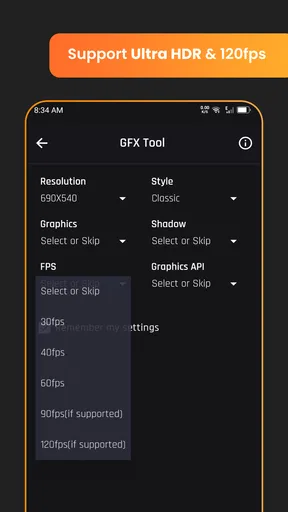
First off, the app offers a variety of tools to amp up your gaming experience. You can customize your graphics settings to match your device’s capabilities, ensuring you get the smoothest and most visually appealing gameplay possible. This is particularly handy if you’re playing resource-heavy games that demand a lot from your device.
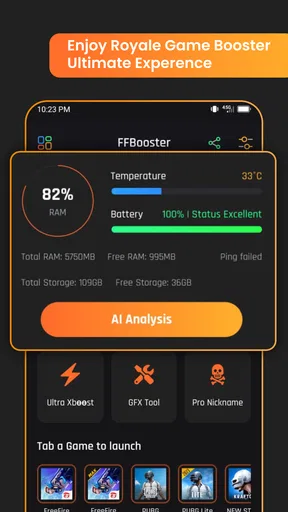
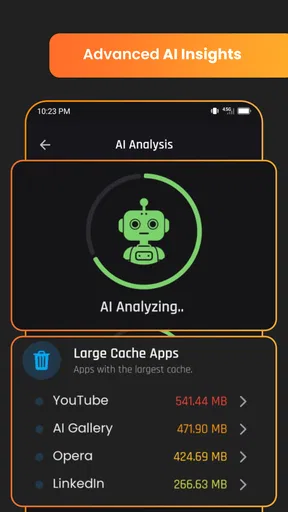
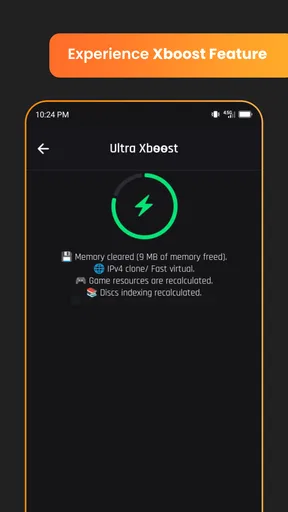
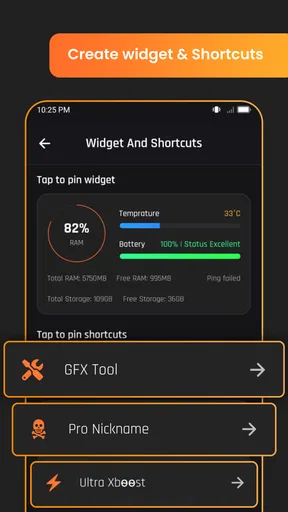
Another cool feature is the RAM booster. It clears out unnecessary background processes, freeing up memory and giving your game the space it needs to run without hiccups. I found this especially useful during intense gaming sessions where every millisecond counts.
The app also comes with a temperature monitor to keep an eye on your device’s heat levels. We all know how hot our phones can get during extended play, and this feature helps prevent overheating by providing real-time updates and suggestions to cool things down.
Putting It to the Test
I decided to test the app with a couple of my favorite games. First up was a popular multiplayer battle game known for its intense graphics and fast-paced action. Before using the app, I experienced occasional lag spikes, which were super annoying during crucial moments.
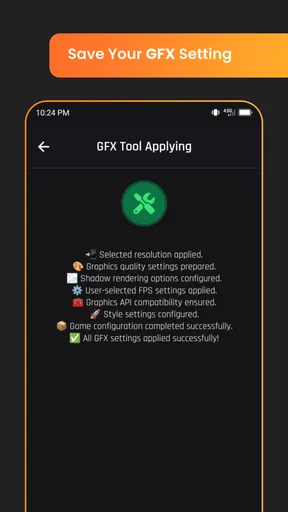
After setting up the Game Booster GFX Fire Fix, I noticed an immediate improvement. The gameplay was noticeably smoother, and I didn’t encounter any more lag spikes. It was as if my device had received a mini-upgrade. The graphics customization allowed me to tweak the visuals to my liking, ensuring I had the perfect balance between aesthetics and performance.
Encouraged by this success, I moved on to a high-demand racing game. Here, the RAM booster really shone. It freed up a significant amount of memory, allowing the game to run seamlessly, even during the most graphics-intensive scenes. The temperature monitor was also a lifesaver, alerting me when my device started getting too hot, so I could take a quick break and let it cool down.
Getting the Most Out of the App
To really harness the power of Game Booster GFX Fire Fix, it helps to spend a bit of time customizing the settings to suit your specific needs. The app offers a user-friendly interface, making it easy to navigate and adjust the settings without getting lost in technical jargon. Whether you’re a casual gamer or a hardcore enthusiast, taking the time to tailor the app’s features can make a big difference in your gaming experience.
The app is perfect for those who want to elevate their gaming without needing to understand the intricate details of device optimization. It does all the heavy lifting, allowing you to focus on what truly matters—enjoying the game.
Final Thoughts
So, is Game Booster GFX Fire Fix the real deal? In my experience, absolutely. It offers a suite of features that genuinely enhance gaming performance. Whether it’s reducing lag, optimizing graphics, or preventing your device from overheating, this app covers all the bases.
If you’re tired of interruptions and want to immerse yourself fully in your games, this app is definitely worth checking out. It’s like having a backstage pass to your own gaming concert, ensuring everything runs smoothly and you can enjoy the show.
Ready to give it a try? You can download Game Booster GFX Fire Fix from your respective app store and see for yourself just how much it can transform your gaming sessions.
Privacy and Permissions
See what permissions an app requests and how it handles your data.
- Photos/Media/Files
- read the contents of your USB storage, modify or delete the contents of your USB storage
- Storage
- read the contents of your USB storage, modify or delete the contents of your USB storage
- Wi-Fi connection information
- view Wi-Fi connections
- Other
- view network connections, pair with Bluetooth devices, full network access, close other apps, prevent device from sleeping, install shortcuts
Verdict
Strengths of Game booster GFX Fire Fix
- Improves game performance significantly.
- Customizable graphics settings.
- Easy-to-use interface.
- Supports a wide range of games.
- Enhances FPS and reduces lag.
Limitations of Game booster GFX Fire Fix
- May not work on all devices.
- Can cause overheating on older phones.
- Some features require root access.
- Occasional app crashes reported.
- Limited support for non-gaming apps.
Similar Picks in This Category
View All
PGT: GFX, Launcher & Optimizer
Trilokia Inc.4.5

AusweisApp Bund
Governikus Service GmbH3.7

Cardboard
Google LLC3.2

Gamers GLTool with Game Tuner
Trilokia Inc.4.5

Multi Web Chat - Read Secretly
World Scan & Cleaner3.8

App Cloner Premium & Add-ons
App Listo1.9
Frequently Asked Questions
What is Game Booster GFX Fire Fix and how does it enhance gaming performance?
Game Booster GFX Fire Fix is an application designed to optimize your gaming experience on Android devices. It enhances performance by adjusting system settings, improving graphics, and reducing lag. The app works by freeing up RAM, minimizing background processes, and tweaking graphical settings to ensure smoother gameplay.
Is Game Booster GFX Fire Fix safe to use on my device?
Yes, Game Booster GFX Fire Fix is generally safe to use on most Android devices. However, it’s important to download it from a trusted source to avoid any security risks. The app makes changes to system settings, so ensure your device is compatible and back up important data before use.
Does Game Booster GFX Fire Fix require root access to function?
No, Game Booster GFX Fire Fix does not require root access to function. It is designed to work on both rooted and non-rooted devices. While rooted devices might allow for more advanced tweaks, the app effectively optimizes performance on standard devices without root.
Can Game Booster GFX Fire Fix improve battery life while gaming?
While Game Booster GFX Fire Fix primarily focuses on enhancing gaming performance, it can indirectly help with battery life. By optimizing the device’s CPU and GPU usage, it may reduce overall power consumption during gameplay. However, intensive gaming will still drain battery relatively quickly.
What types of games benefit most from Game Booster GFX Fire Fix?
Game Booster GFX Fire Fix is particularly beneficial for high-performance and graphically intensive games, such as battle royales and open-world RPGs. These games often require more resources, and the app helps in optimizing graphics and performance for a smoother gaming experience.
